> ## Documentation Index
> Fetch the complete documentation index at: https://docs.danahq.com/llms.txt
> Use this file to discover all available pages before exploring further.
# June 2026
> Dana now connects with Notion, HubSpoot, and more.
## Bring your Notion workspace into every brief 📝
Dana now pulls from your Notion workspace, so the research and writing you've already done shows up automatically when you need it. It pulls in account research, prep docs, meeting notes, and anything you've written about the people and companies you're meeting with.
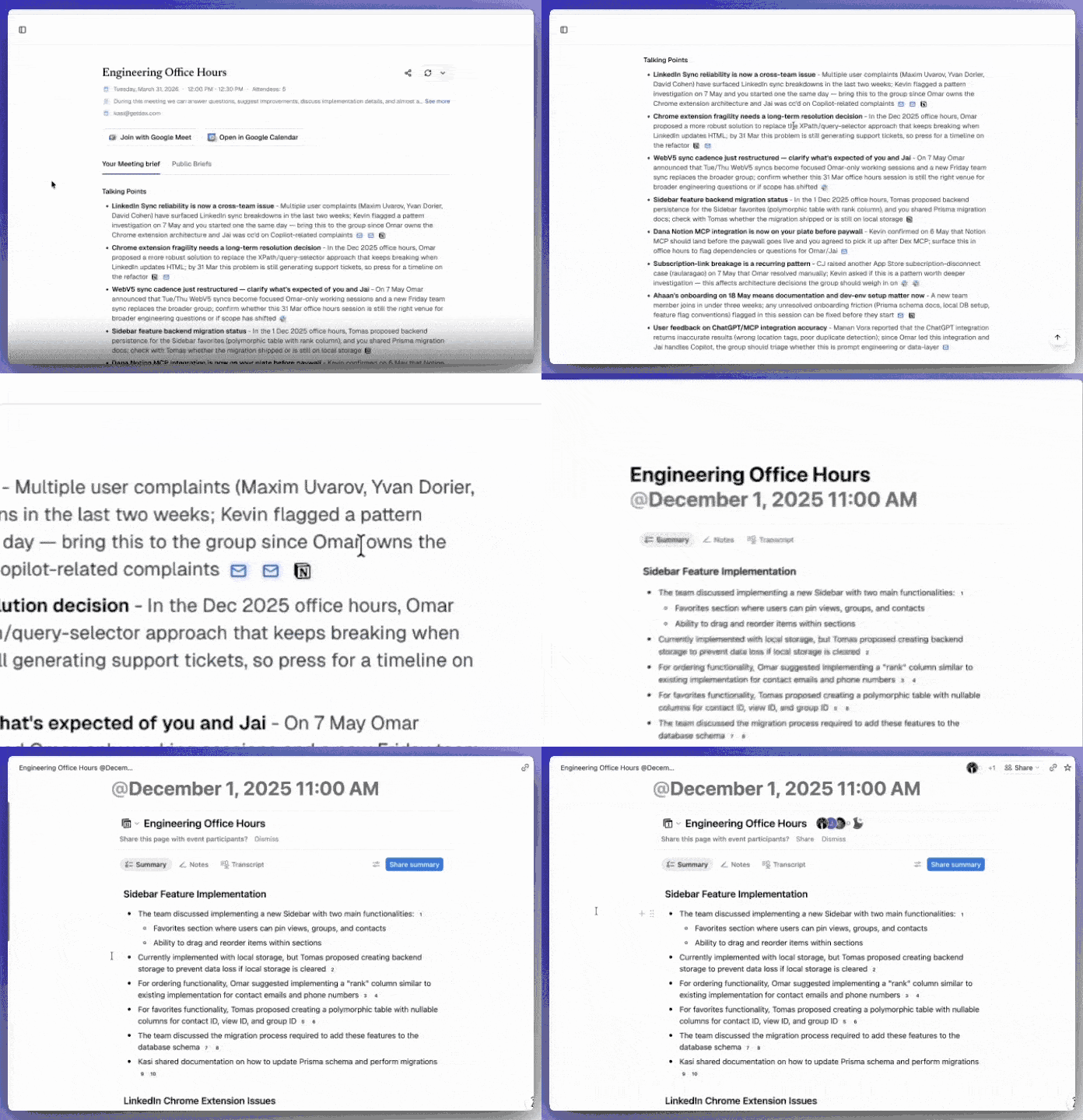 Inside your brief, relevant Notion content surfaces as a citation, with a Notion icon next to it. Click through and you go straight to the original page, so you can always trace an insight back to its source and read the full context.
**To connect,** go to **Settings > Integrations**. Find the Notion card and authorize access. Once connected, Dana starts drawing on your workspace for future briefs.
To learn more about this integration, read [our documentation](/integrations/notion).
## HubSpot is now connected to Dana 🤝
If your team lives in HubSpot, Dana now knows what your CRM knows, and there won't be copying and pasting deal notes before a call anymore.
Inside your brief, relevant Notion content surfaces as a citation, with a Notion icon next to it. Click through and you go straight to the original page, so you can always trace an insight back to its source and read the full context.
**To connect,** go to **Settings > Integrations**. Find the Notion card and authorize access. Once connected, Dana starts drawing on your workspace for future briefs.
To learn more about this integration, read [our documentation](/integrations/notion).
## HubSpot is now connected to Dana 🤝
If your team lives in HubSpot, Dana now knows what your CRM knows, and there won't be copying and pasting deal notes before a call anymore.
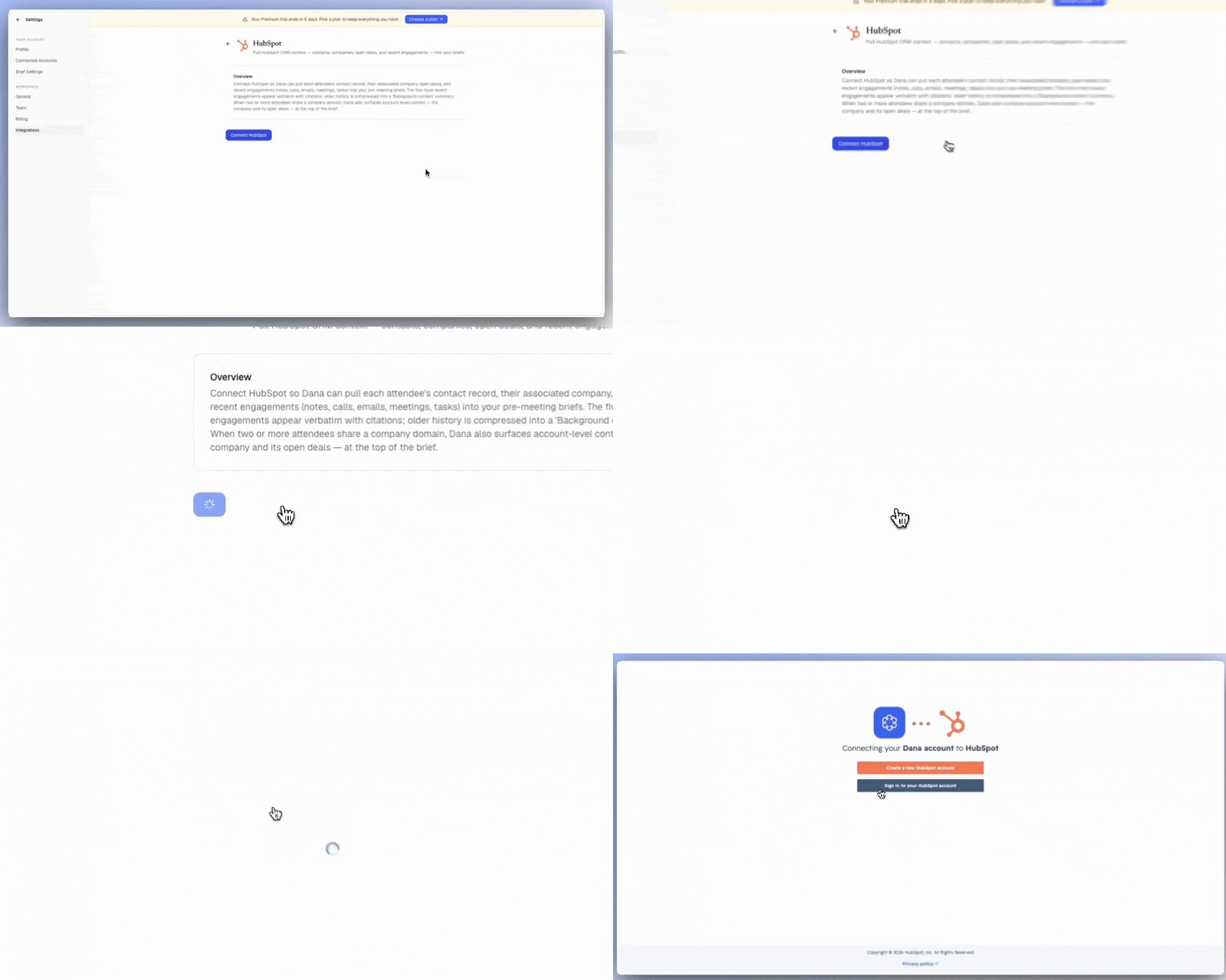 **What Dana does in HubSpot for you:**
* Pulls deal context, contact history, and CRM notes automatically into meeting briefs
* Surfaces the people and companies on your calendar with relevant context
* Shows where each deal stands before your meeting
* Brings together logged activities and relationship history in one place
* Requires no manual preparation or data gathering
**To connect,** go to **Settings > Integrations**. Find the HubSpot card and authorize access. Once connected, Dana starts drawing on your workspace for future briefs.
Learn more about our HubSpot integration on [this page](/integrations/hubspot).
## Your Granola notes, right in your briefs 🥣
Connect Granola to Dana and it brings your meeting summaries, notes, and transcripts straight into your briefs.
Anytime Dana sources something from Granola, a citation appears next to it. Click it to jump right into those notes in the Granola desktop app.
**What Dana does in HubSpot for you:**
* Pulls deal context, contact history, and CRM notes automatically into meeting briefs
* Surfaces the people and companies on your calendar with relevant context
* Shows where each deal stands before your meeting
* Brings together logged activities and relationship history in one place
* Requires no manual preparation or data gathering
**To connect,** go to **Settings > Integrations**. Find the HubSpot card and authorize access. Once connected, Dana starts drawing on your workspace for future briefs.
Learn more about our HubSpot integration on [this page](/integrations/hubspot).
## Your Granola notes, right in your briefs 🥣
Connect Granola to Dana and it brings your meeting summaries, notes, and transcripts straight into your briefs.
Anytime Dana sources something from Granola, a citation appears next to it. Click it to jump right into those notes in the Granola desktop app.
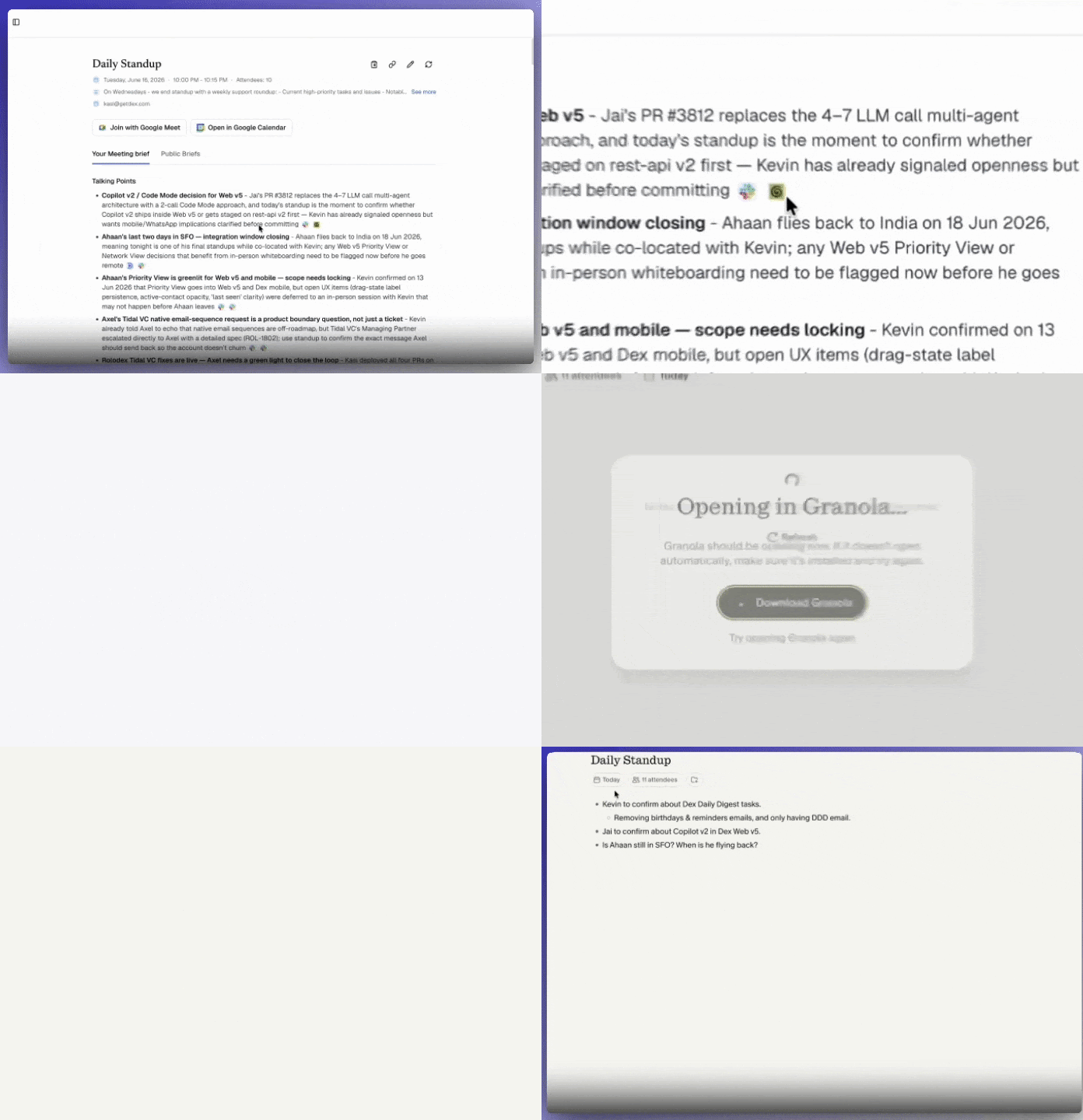 It's read-only, so Dana never touches anything in Granola itself.
To read more about our Granola integration, visit [our page](/integrations/granola).
## Connect anything with custom MCP servers 🔌
Beyond our native integrations, Dana now supports custom MCP (Model Context Protocol) servers.
It's read-only, so Dana never touches anything in Granola itself.
To read more about our Granola integration, visit [our page](/integrations/granola).
## Connect anything with custom MCP servers 🔌
Beyond our native integrations, Dana now supports custom MCP (Model Context Protocol) servers.
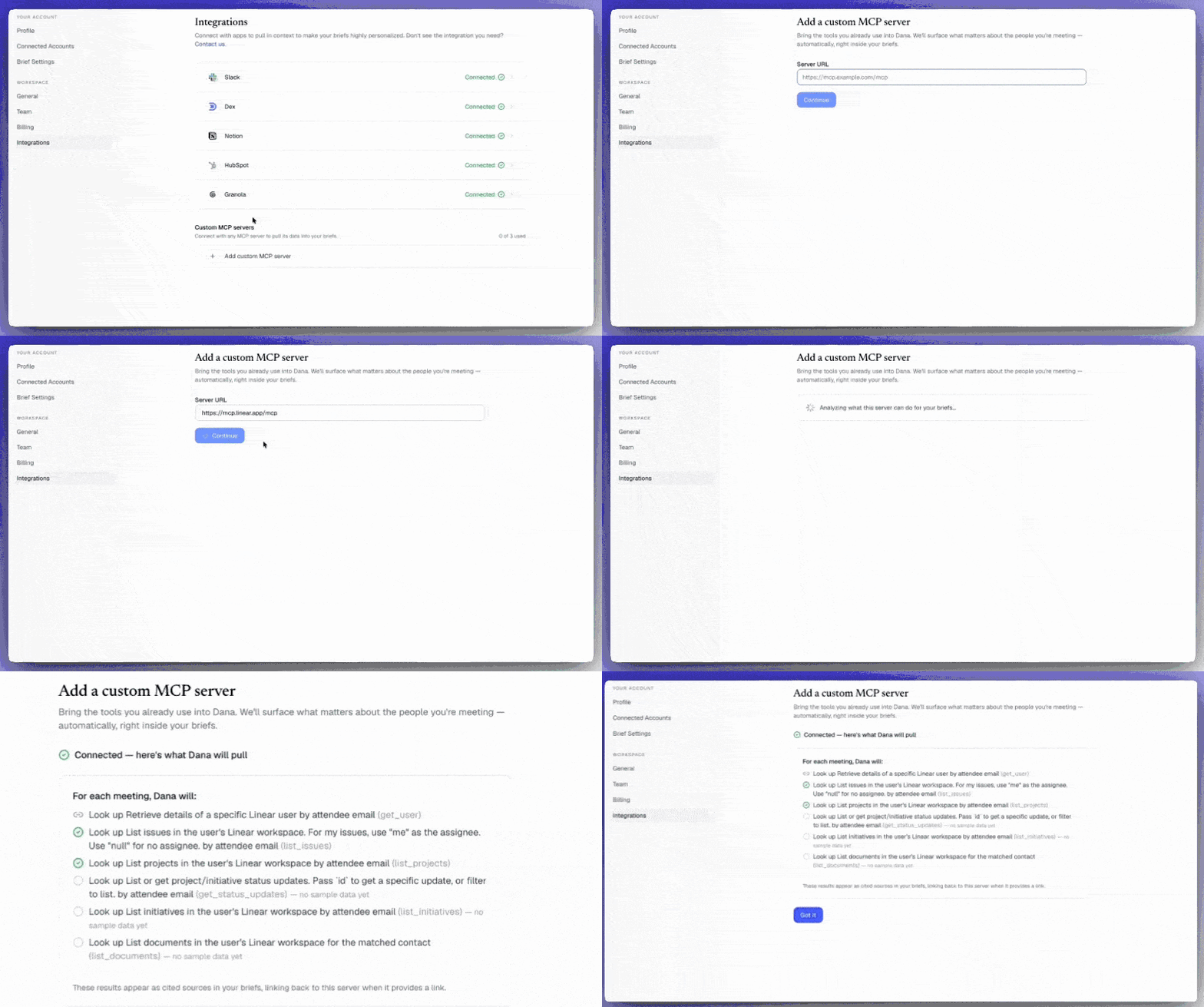 If your team relies on a tool we don't natively support yet, connect it through its MCP server and Dana will fold that context into your briefs.
This means Dana isn't capped at the integrations we've built. Any tool with an MCP server can become a brief source, with the same citations and traceability you get everywhere else in Dana.
Visit [this page](/integrations/custom-mcp) for more information.
## Bug fixes and improvements 🧩
We've also refined the following in this launch:
**Fixed**
* Briefs being sent for meetings that were rescheduled to a future date.
* Briefs generating for meetings even when turned off in settings.
* A delay in the "brief ready" badge appearing on Home event cards.
* Citation icons not appearing in Dana emails.
* Citations from getdex.com rendering the wrong (danahq.com) icon in brief emails.
* The "Regenerate brief" card not closing when clicking outside it.
**Added**
* An account reconnection email so you're notified when a connected account's credentials expire.
* A "Copy text" button to brief pages for quick, Slack-friendly sharing.
* Connection status indicators to each integration card.
* Automatic brief generation when opening a brief from Google Calendar via the extension.
**Improved**
* Timeline with a faster-loading, month-grouped event list.
* Onboarding flow.
If your team relies on a tool we don't natively support yet, connect it through its MCP server and Dana will fold that context into your briefs.
This means Dana isn't capped at the integrations we've built. Any tool with an MCP server can become a brief source, with the same citations and traceability you get everywhere else in Dana.
Visit [this page](/integrations/custom-mcp) for more information.
## Bug fixes and improvements 🧩
We've also refined the following in this launch:
**Fixed**
* Briefs being sent for meetings that were rescheduled to a future date.
* Briefs generating for meetings even when turned off in settings.
* A delay in the "brief ready" badge appearing on Home event cards.
* Citation icons not appearing in Dana emails.
* Citations from getdex.com rendering the wrong (danahq.com) icon in brief emails.
* The "Regenerate brief" card not closing when clicking outside it.
**Added**
* An account reconnection email so you're notified when a connected account's credentials expire.
* A "Copy text" button to brief pages for quick, Slack-friendly sharing.
* Connection status indicators to each integration card.
* Automatic brief generation when opening a brief from Google Calendar via the extension.
**Improved**
* Timeline with a faster-loading, month-grouped event list.
* Onboarding flow.